

Minimalist Desk Setup for 2026: A Practical Guide
Table of Contents
- Why a Minimalist Desk Setup Matters in 2026
- Cable Management Solutions for Minimalist Desks
- Ergonomic Desk Setup Essentials for Long Workdays
- Multifunctional Desk Gadgets That Replace Three Things at Once
- Lighting, Color, and Materials for a Clean Aesthetic
- Small-Space and Neurodivergent-Friendly Minimalism
- Common Minimalist Desk Mistakes to Avoid
- Conclusion: Your Minimalist Desk Setup for 2026
- Frequently Asked Questions
Last Updated: October 1, 2026
Why a Minimalist Desk Setup Matters in 2026
A minimalist desk setup for 2026 is a workspace built around only what you use daily, with every item earning its place through function. The payoff: less visual noise, faster task switching, and a surface that adapts when your work does. This guide from Anvil covers the practical decisions, from cable routing to ergonomics, that separate a setup that looks clean in photos from one that stays clean after a full workday.
Cable Management Solutions for Minimalist Desks
Cable management solutions for minimalist desks work best when you treat cables as infrastructure, not accessories. Route once, bundle once, and never touch the run again. The goal is a single visible cable at most, ideally the one powering your monitor.
Cable Trays and Under-Desk Routing
Mount a cable tray or J-channel to the underside of the desk, then run every power brick and adapter into it. Adhesive clips fail on painted or textured surfaces within months; screw-mounted trays do not. Leave a 15-centimeter service loop at each device so you can move a monitor or swap a keyboard without redoing the run.
Label both ends of every cable with tape.
Wireless Charging and Power Integration
The fastest way to cut visible cables is to stop creating them. A wireless charger removes your phone's charging cable entirely, and a built-in power strip with USB-C ports removes wall adapter clutter under the desk.
Ergonomic Desk Setup Essentials for Long Workdays
Ergonomic desk setup essentials for long workdays come down to three measurements: seat height, monitor height, and elbow angle. Get those right and most of the discomfort complaints disappear. The OSHA computer workstation guidance covers the core positions in plain language.
Chair, Monitor, and Desk Surface
- Chair: Feet flat, thighs parallel to the floor, lumbar support contacting your lower back. Armrests should sit just below your elbows, not lift your shoulders.
- Monitor: Top of the screen at or slightly below eye level, roughly an arm's length away. A monitor arm frees the desk surface entirely and makes this adjustment trivial.
- Desk surface: Elbows at about 90 degrees, wrists straight. A desk pad adds a consistent texture and protects the finish.
Standing desks help only if you actually alternate. A desk that stays in one position is just a desk.
Multifunctional Desk Gadgets That Replace Three Things at Once
Multifunctional desk gadgets earn their place by doing the job of several single-purpose items. The test: if a gadget replaces two or more things you already own, it reduces clutter. If it replaces one, it is just another object.
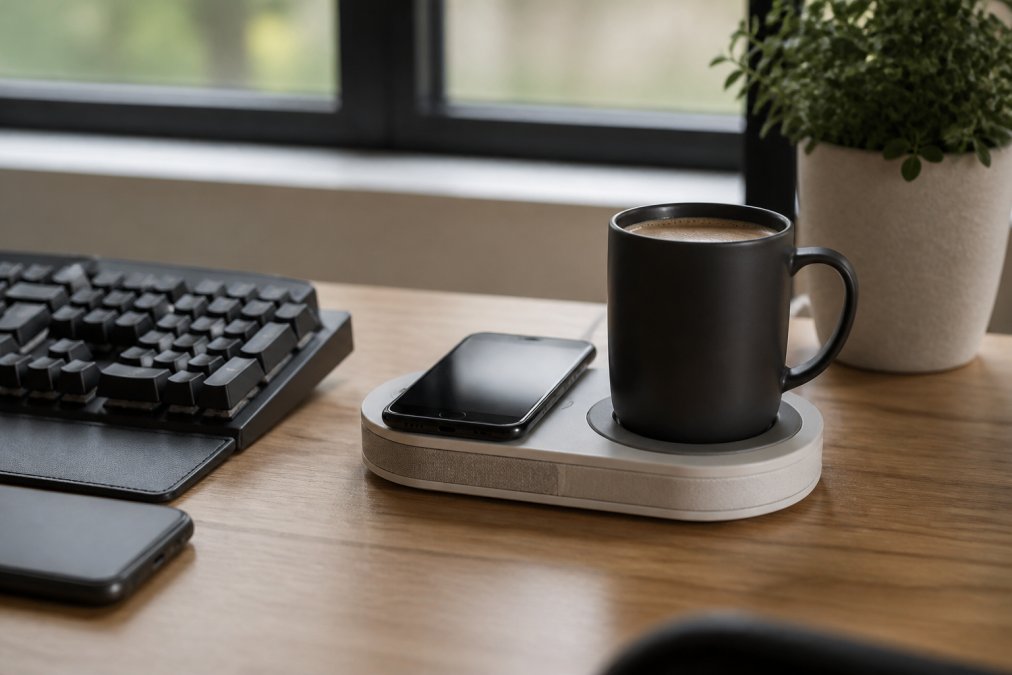
A few categories consistently pass that test:
- Charging plus warming. One pad charges a phone and keeps a mug at temperature, replacing two devices and two cables.
- Monitor arm with USB hub. Lifts the display and consolidates peripheral connections at the same point.
- Keyboard with built-in media controls. Removes a separate control dial from the surface.
Lighting, Color, and Materials for a Clean Aesthetic
Ambient lighting does more for a clean aesthetic than any single purchase, and it is the most commonly botched. A warm bias light behind the monitor reduces eye strain and makes the wall read as intentional rather than blank. Add one task light for focused work and skip overhead fluorescents where you can.
Lighting That Works at Hour Six, Not Just in Photos
Three layers cover almost every setup:
- Bias light. A warm LED strip or small lamp behind the monitor at roughly 2700K to 3000K. This layer kills the harsh contrast between a bright screen and a dark wall.
- Task light. A focused, adjustable lamp aimed at the desk surface, not your eyes. Position it opposite your dominant hand so it does not cast a shadow across your keyboard.
- Ambient fill. A floor lamp or dimmable ceiling fixture on a warm setting. Put a single overhead light on a dimmer, full brightness versus 40 percent is the difference between a workspace and an interrogation room.
Set the bias light and task light on separate switches so you can run one without the other. Color temperature consistency matters more than any single fixture: mixing a 5000K overhead with a 2700K desk lamp makes even a tidy desk look unfinished.
Color Palettes That Survive Daily Use
Color coordination is easier than it sounds. Pick two neutrals and one accent, then apply that rule to every visible object: desk pad, cable sleeves, plant pot, even the mug. All-white and all-black setups both fail in daily use, white shows every smudge, black every speck of dust. A warm mid-tone neutral (walnut, oatmeal, warm gray) hides wear and photographs well.
Materials and the Sustainability Question
Materials should be consistent, choose wood tones or matte finishes and stay with them, but the bigger 2026 shift is where those materials come from. Buyers increasingly weigh repairability and material sourcing alongside looks, a shift documented in consumer sustainability research from Deloitte.
- Solid wood over veneer where the budget allows. Veneer chips at the edges and cannot be sanded or repaired; solid wood can be refinished.
- Replaceable parts over sealed units. A monitor arm with standard VESA mounting and a keyboard with swappable switches will outlast a sealed all-in-one by years.
- Secondhand and upcycled first. A used solid-wood desk, a refurbished monitor, or a repainted filing cabinet as a drawer unit costs less and keeps material out of the waste stream. Check dimensions and stability before buying used; wobble is the most common failure point.
- Fewer, better objects. The most sustainable desk is the one you do not replace. Requiring each item to replace two others (see the gadgets section) is a sustainability strategy as much as a clutter strategy.
Small-Space and Neurodivergent-Friendly Minimalism
Small-space minimalism and neurodivergent-friendly design share a core principle: reduce what competes for attention. In an apartment or shared space, that means treating the desk as a zone rather than a room, and sensory load as a design constraint rather than an afterthought. Most guides assume a dedicated office; the reality for many renters is a desk wedged into a bedroom, closet, or kitchen counter.
Making a Desk Work in a Corner, Closet, or Shared Room
Start with the footprint, not the furniture. A standard 48-inch desk needs about 30 inches of clearance behind the chair, so a 60-inch wall can hold a desk and chair but not much else. If you have less, three moves reclaim the most usable area:
- Go vertical. Wall-mounted shelves above the monitor replace a hutch and keep the surface clear. Keep the lowest shelf at least 18 inches above the desk so a monitor arm can still travel.
- Mount the display. A monitor arm removes the stand's footprint and lets you push the screen flat against the wall when not in use. This is the highest-yield change in a small room.
- Choose a desk that changes shape. A wall-mounted folding desk or rolling cart-style desk lets the same square footage serve as workspace by day and living space at night. Measure the folded depth before buying; many folding desks still project 6 to 8 inches when closed.
Sensory-Friendly Adjustments That Actually Help
For anyone who finds visual or auditory noise distracting, a few adjustments do more than a full redesign:
- Closed storage over open shelving. Items stay accessible but out of the visual field. A single drawer or lidded box handles most daily-carry clutter.
- One designated tray for keys, wallet, and headphones, so nothing migrates across the surface and "out of place" is obvious at a glance.
- A single accent color applied only to functional items, so the eye has one anchor instead of many.
- Acoustic softening. Hard surfaces, bare walls, glass, hardwood, reflect sound and make a small room feel louder. A rug under the chair, a fabric bulletin board, or a bookshelf against one wall reduces reflected noise without looking like treatment.
- Lighting you can dim. Overhead fluorescents are the most common complaint in small spaces. A dimmable task light plus a warm bias light behind the monitor gives you control over brightness and color temperature.
Digital Minimalism Belongs in the Same Conversation
A clean physical desk paired with a chaotic screen is only half the job. Digital minimalism is the part most desk-setup guides skip, and where the productivity payoff compounds:
- Dock with five icons or fewer. Everything else lives in a launcher or search. The dock is the digital equivalent of your desk surface.
- One folder per active project, archived when done. A desktop with files scattered across it recreates the visual noise you just removed from the room.
- Notifications off during focus blocks. The Nielsen Norman Group's research on visual clutter found that interface clutter measurably slows task completion, and the same principle applies to the desk in front of you.
- A single capture inbox. One note or task list where everything lands, reviewed on a schedule, so open loops do not live in your head.
Common Minimalist Desk Mistakes to Avoid
The most common minimalist desk mistakes all trace back to buying before measuring:
| Mistake | Why It Hurts | The Fix |
|---|---|---|
| Buying the desk last | Everything else must fit it | Measure the space, then buy the desk |
| Hiding cables, not routing them | Tangles return within weeks | Use a tray and label both ends |
| All-white everything | Shows every smudge and scratch | Mix two neutrals |
| Skipping the monitor arm | Stand eats surface area | Mount the display |
| Too many "minimal" gadgets | Each one adds a cable | Require two-for-one replacements |
Conclusion: Your Minimalist Desk Setup for 2026
Building a workspace that stays clean after a full week is harder than it looks, especially when charging cables and cooling drinks compete for the same square of desk. Anvil designed the Sip & Charge 2-in-1 Wireless Charger & Mug Warmer for exactly that problem: it keeps your beverage warm, charges your phone wirelessly, and removes two separate devices from your surface in one move.
Frequently Asked Questions
What are the most common minimalist desk mistakes?
The biggest mistake is removing so much that basic function breaks. People ditch cable trays and end up with a nest of wires behind the monitor, or skip task lighting and strain their eyes by mid-afternoon. Another common error is buying cheap accessories that fail within months, which forces replacements and defeats the point of minimalism. Keep what you use daily, hide what you don't, and spend on the few items that earn their footprint.
How can I hide cables in a minimalist desk setup?
Start with a cable tray mounted under the desk surface to hold power strips and excess cord length. Route display and peripheral cables through adhesive clips along the back edge, then bundle them with velcro ties instead of zip ties so you can adjust later. A cable management box at floor level hides the run to the wall outlet. If your charger and mug warmer share one device, you also remove an entire power cord from the equation.
How does multifunctional tech improve desk minimalism?
Every device on your desk needs power, space, and a cable. Combining functions cuts all three at once. A 2-in-1 wireless charger and mug warmer, for example, replaces two separate units with one footprint and one cord. That matters most on smaller desks where a few inches decide whether you have room for a notebook or a second display. Fewer devices also means fewer things to clean around and less visual noise.
What is the best way to organize a small desk for maximum productivity?
Work vertically first. A monitor arm frees the entire surface beneath the screen, and a clamp-on shelf or drawer adds storage without legs. Keep only what you touch every hour within arm's reach: keyboard, mouse, charger, and your drink. Everything else goes in a drawer or off the desk entirely. Set your monitor at eye level with the top third of the screen, and position your charger where you naturally set your phone down.
Will a wireless charger work with my phone case on?
Most cases under about 3 millimeters thick work fine with standard wireless charging. Thick rugged cases, wallets with magnetic strips, and metal plates interfere with the charging coil. If your phone charges slowly or gets warm without gaining much power, the case is usually the cause. Test without the case first to confirm the charger is working, then decide whether a thinner case is worth the trade.
How do I keep my coffee warm without adding clutter?
A mug warmer keeps your drink at a steady temperature instead of reheating it in bursts, and a combined charger-warmer unit means you are not adding a second device to the desk. Look for one with a flat heating surface that fits your usual mug and an auto shut-off so it does not run all day. Place it slightly to your non-dominant side so reaching for coffee does not interrupt typing.